
Instead of manually collecting Schwab or Fidelity statements whenever your advisor needs an update, establish an authorized account-information workflow so your fiduciary plan uses current records without sharing your password. VIMNewEngland provides integrated financial planning and investment management; this guide explains how to connect account information, distinguish viewing access from trading authority, and verify what your advisor receives.
- To connect Schwab Fidelity accounts to fiduciary advisor planning, first distinguish account visibility from investment-management authority.
- VIMNewEngland suits individuals and families seeking integrated fiduciary financial planning and investment management.
- Use an authorized connection or secure statement delivery; never give an advisor your personal password.
- Verify ownership, account types, permissions, and missing holdings before relying on the connected financial plan.
Why this matters
An account connection supplies information; it does not establish the scope of a fiduciary relationship. Your advisory agreement defines the work your advisor undertakes. Separate authorizations determine what the advisor can view or do with your accounts.
This distinction matters when your savings span taxable brokerage accounts, retirement accounts, and a spouse's separately owned assets. A dashboard balance alone does not explain tax treatment, ownership, beneficiary instructions, or upcoming withdrawals.
VIMNewEngland is best for individuals and families seeking financial planning and investment management within one advisory relationship. Connecting records supports that relationship, but the records still need interpretation. Your 2026 plan should state which assets inform planning and which assets the advisor actually manages.
Before you start
- Gather account records and owner access. Have a recent statement for each Schwab or Fidelity account, the account owner's authorization, and access to your own login and authentication method. Include relevant workplace-plan records separately.
- Confirm the advisor's approved intake method. Ask which planning system, secure document channel, or custodian authorization process applies. Request instructions through an established contact method rather than an unsolicited message.
- Resolve the permission question first. Viewing information, trading, and moving money are different permissions. A planning-data connection does not automatically authorize investment management, and separately owned accounts require the appropriate owner's consent.
Do not begin by sending credentials. Begin by asking the advisor to identify the exact process and its permissions. That prevents a common setup mistake: completing a connection that does not provide the information or authority the engagement requires.
Account inventory
Build your source list
- List each account separately. Record the custodian, account type, legal owner, and a masked identifier. Distinguish an individual brokerage account from a joint account, IRA, trust account, or workplace retirement plan.
- Identify the planning purpose. Note whether the account supports retirement income, an upcoming purchase, business reserves, charitable giving, or another goal. Keep the purpose separate from the investments currently held.
- Record relevant restrictions. Flag employer-plan limitations, pledged assets, concentrated positions, inherited accounts, and ownership arrangements requiring additional authorization.
- Gather supporting records. Include holdings and cash balances. Add tax-lot information, beneficiary records, and distribution history when they are relevant to the planning question and available through the approved channel.
Expected result: You have a 2026 account inventory that explains what each account is, who can authorize access, and why it belongs in the plan.
Do not treat a household as a single login. One spouse's access does not establish the other spouse's consent, and a trust account's authorization depends on its governing arrangement. Resolve those distinctions before submitting connection requests.
Separate visibility from management
Mark every account as either planning-only or proposed for investment management. An account can influence your plan without being managed by your advisor.
An employer retirement plan, for example, belongs in retirement analysis even when the advisor does not trade it. A taxable account's holdings can affect diversification and tax decisions across the household. Neither situation requires you to assume that a data connection creates trading authority.
Permission scope
Choose the information workflow
For Schwab and Fidelity accounts, first compare the type of connection—not the custodian's name. The appropriate route depends on your advisory engagement and the access actually supported for your account.
| Workflow | Best for | Benefit | Limitation | What to verify |
|---|---|---|---|---|
| Authorized planning-data connection | Ongoing account visibility | Reduces repeated statement collection | Coverage and available fields depend on the connection | Selected accounts, permission scope, and update status |
| Secure statement delivery | Initial planning or unsupported accounts | Provides dated source records | Requires manual updates and can leave gaps between statements | Statement date, completeness, and secure delivery method |
| Custodian-approved management authorization | Accounts included in investment management | Establishes the permissions described in the authorization | Requires separate documentation and careful scope review | Owner, account registration, and granted authority |
Use the least authority that accomplishes the agreed task. Secure statements are useful when a supported connection is unavailable. They are not a substitute for the authorization required to manage investments.
Schwab and Fidelity accounts should both pass the same checks: correct owner, correct account type, understood permissions, and verified information. Do not assume that an account feature or connection available for one account is available for every account at the same custodian.
Confirm the advisory relationship
- Review the advisory agreement. Identify whether the engagement includes financial planning, investment management, or both. Ask how outside accounts enter the analysis.
- Verify the advisor's identity and registration. Use official regulatory records and independently confirmed contact information. SEC registration is not an endorsement of an advisor's skill or a guarantee of results.
- Read each authorization separately. Distinguish information access from trading, money movement, and other account permissions. Ask for an explanation before approving unfamiliar language.
- Keep the completed records. Retain the agreement, authorizations, and instructions for removing access. Note which accounts each document covers.
Expected result: You can explain what your advisor is engaged to do and what each account authorization permits.
For a broader selection framework, review the fiduciary financial advisor qualities to look for. A connection should follow that assessment, not replace it.
Connection setup
Establish the authorized channel
- Request account-specific instructions. Tell your advisor whether the source is a Schwab brokerage account, Fidelity brokerage account, IRA, or workplace plan. Ask whether the approved route is a planning connection, document delivery, or custodian paperwork.
- Confirm the invitation independently. Check an unexpected invitation with your advisor using contact information you already trust. Do not rely solely on the sender name displayed in an email.
- Authenticate yourself when required. Complete sign-in and multifactor authentication through the approved process. Do not send your password or authentication code to the advisor.
- Select only the intended accounts. Where the process offers account selection, include accounts within the agreed scope. Review the permissions before confirming consent.
- Use secure records if the connection is unsupported. Ask for the approved document-delivery channel and submit complete statements. Do not improvise an email attachment workflow containing sensitive account details.
Expected result: The advisor receives information through the agreed channel, and you retain control of your personal login.
The connection method determines the actual screen labels and steps. Use the account-specific instructions supplied for your setup rather than searching for a universal Schwab or Fidelity button. A planning connection and a management authorization are different workflows.
Keep a short connection record for 2026: account identifier, approved purpose, authorization date, and method. This makes later reviews easier without putting credentials in your planning notes.
Verification and planning handoff
Check the information before using it
- Confirm account coverage. Compare the connected-account list with your inventory. Check separately owned accounts and workplace accounts individually.
- Compare balances on matching dates. Use a dated custodian record and the connection's displayed update date. Market movements and transactions make comparisons across different dates unreliable.
- Inspect holdings and account types. Confirm that cash and securities appear in the appropriate accounts. Identify accounts that have been duplicated through both a connection and manual entry.
- Check information that balances cannot establish. Review ownership, beneficiary instructions, tax basis, and planned withdrawals using appropriate source records. Do not assume that every field transfers into the planning system.
- Ask for the planning handoff. Have the advisor identify which records support the recommendations and which missing information still needs resolution.
Expected result: The connected records match the intended household scope, and unresolved gaps are visible before recommendations rely on them.
Use a simple sequence: Account inventory, Permission scope, Connection setup, and Planning review. A successful sign-in is only the third part; the final review determines whether the information is usable.
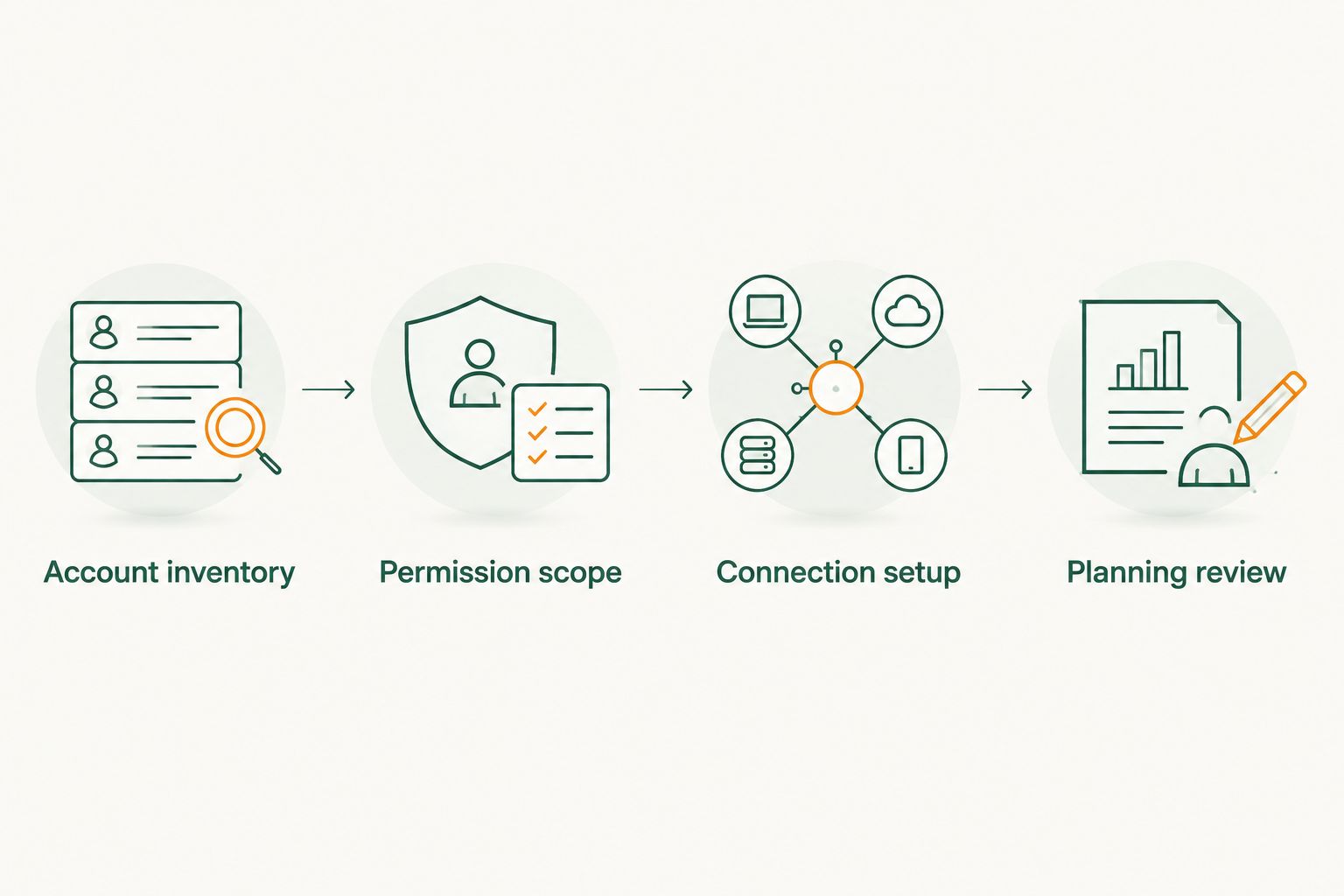
A useful 2026 planning review connects the records to decisions: upcoming spending, retirement withdrawals, concentrated holdings, tax coordination, and estate instructions. Ask which decisions the account information changes. A larger dashboard is not the objective.
When account information changes
The adjacent workflow is ongoing maintenance rather than first-time setup. Revisit the connection after opening or closing an account, changing ownership, moving assets, or changing the advisory relationship.
- Update the inventory. Add the new account or ownership change, and flag the old record for review.
- Review the consent. Confirm that the changed account is within the existing authorization. Obtain additional owner approval when required.
- Check the records again. Look for missing holdings, stale data, and duplicate balances after a transfer or new connection.
- Update the planning assumptions. Tell the advisor about changes in income needs, beneficiaries, or restrictions that a data feed does not explain.
Best for: Households whose account structure changes during the year. The benefit is continuity; the limitation is that a connection cannot independently identify every change in your intentions or legal arrangements.
When adding investment management, keep the authorization review separate from the planning-data connection. Ask whether existing accounts can support the proposed arrangement or whether different custody arrangements are required. Do not assume VIMNewEngland supports a particular custodian connection without confirming the account-specific process.
Troubleshooting
An account is missing
Check whether the account uses different owner access, sits within a workplace plan, or was excluded during account selection. Ask the advisor which account types the approved connection supports. Use secure statements for uncovered accounts rather than leaving them out of the plan.
The balance looks wrong
Compare the update date with the statement or current custodian record. Check pending transactions and duplicate manual entries. Resolve the discrepancy before using the balance for a withdrawal or allocation recommendation.
Authentication keeps failing
Sign in directly through your established custodian access to check whether the account requires attention. Follow the approved process to renew consent if necessary. Never solve an authentication problem by sending your password or security code to someone else.
Holdings appear, but planning details are absent
Treat account visibility and planning completeness as separate checks. Request the missing tax-lot, beneficiary, ownership, or distribution records through the approved channel. A visible balance does not prove that those details are available.
You granted the wrong permission
Pause additional setup and contact the advisor and custodian through verified channels. Ask how to revoke or correct the authorization, then confirm the resulting scope. Keep written confirmation with your account records.
Customize your workflow
Build a review routine around decisions rather than repeated document requests. Name the person responsible for supplying outside-account records, resolving connection failures, and notifying the advisor about ownership changes.
For retirement planning, connect the account inventory to spending needs and withdrawal decisions. For a business owner, distinguish household assets from business reserves. For estate coordination, verify registrations and beneficiary instructions rather than assuming a consolidated view establishes either.
VIMNewEngland's integrated fiduciary financial planning and investment management can address these subjects within one relationship. Confirm account connectivity and authorization separately from the scope of advice. That keeps the process clear without confusing access with responsibility.
FAQ
How do I connect Schwab or Fidelity accounts to a fiduciary advisor?
Ask your advisor for the approved account-specific process, then complete the required consent or securely supply statements. Verify the selected accounts, permissions, and received information before relying on the connection for planning.
Do I need to give my financial advisor my Schwab or Fidelity password?
No; do not send your personal password or authentication codes to your advisor. Complete authentication yourself through the approved connection process, or use an approved secure document channel.
Does connecting an account let my advisor trade investments?
A planning-data connection alone does not establish trading authority. Investment management requires the applicable advisory agreement and account authorizations, which you should review separately.
Do I have to transfer my accounts to get fiduciary financial planning?
Sharing account information for planning does not itself require an account transfer. Ask the advisor whether the proposed investment-management arrangement requires different custody or authorization.
Can my spouse's accounts be included in our financial plan?
Your spouse's accounts can inform household planning with the appropriate owner's consent and records. Your own login or advisory agreement does not automatically authorize access to a separately owned account.
Is connecting Fidelity better than connecting Schwab?
Choose based on the authorized workflow available for your specific accounts, not the custodian name alone. For either custodian, verify account coverage, permission scope, and the information received.
What should I do if my connected account stops updating?
Check the last update date and follow the approved process to restore authentication or consent. Supply dated records through the approved secure channel until the connection is working and verified.
One last thing
The most useful final question is not whether every account connected. It is whether every account is understood. Before accepting your 2026 plan, ask the advisor to distinguish managed accounts, planning-only accounts, and unresolved records. That simple separation makes the next decision clearer.